Showing posts with label PC Hardware. Show all posts

Wednesday, December 5, 2012

For Beginners, Ever Used A Computer Mouse Before?


This is a lesson for beginning computer mouse users.

Learn how to hold the computer mouse:
Hold the sides of the mouse with your thumb on one side and ring finger or pinkie, which ever feels more comfortable to you, on the other side. Your index finger goes on the left button and your middle finger on the right button. (Some computer mice only have one button, some have several, some have a wheel which you can use your middle finger to depress the wheel then turn it up or down to scroll pages very quickly or slow depending on how quickly you turn the wheel. Personally I love the wheel and would not have a mouse without it!) When you are told to 'click' use the button under your index finger, or the left button.
Learn how to move the computer mouse:
Slowly slide the mouse around on the mouse pad. See what happens to the arrow on the screen as you slide it around.

Do you need a mouse pad:
You should have a mouse pad under your mouse, (although the new optic mice do not require one). You will

Wednesday, November 28, 2012

The Alphabet of Computer Memory


Computer memory is called Random Access Memory (RAM). The information stored in RAM can be accessed randomly, rather than sequentially. This means that data can be found in any location at the same rate of speed. Other storage media, such as CD-Rom and hard drives, must wait while the drive spins to the correct location before the data can be accessed.
                                     
Computer memory is simply a storage area for the program code and the data that program uses. Computer programs use RAM to write and retrieve information, allowing for fast data retrieval and manipulation.


How Much RAM is Enough?
Simply stated, the answer is, as much as possible. Keep in mind, though, once you've reached a certain upper limit, which is determined by the computer program(s) used, investment in more memory will see a diminished return.

Saturday, November 10, 2012

Hardware Cleaning Tips - 1

Case cleaning
Case cleaning keeps the appearance of the computer looking new. During cleaning, if ventilation locations are found, these can be cleaned helping the case keep a steady airflow to the computer, keeping components cool and in good working condition.
The plastic case that houses the PC components can be cleaned with a lint-free cloth that has been slightly dampened with water. For stubborn stains, add a little household detergent to the cloth. It is recommended that you never use a solvent cleaner on plastics.

Make sure all vents and air holes are hair and lint free by rubbing a cloth over the holes and vents. It is also helpful to take a vacuum around each of the hole, vents, and crevices on the computer. It is safe to use a standard vacuum when cleaning the outside vents of a computer; however, if you need to clean the inside of the computer, use a portable battery powered vacuum to prevent static electricity.

Thursday, July 26, 2012

Printers


A printer is a computer whose sole purpose is to convert electronic pulses into image on paper. Although printers come as separate devices, they are an integral part of a computer system. There are several types of printers available in the market. Following is description how these printers work.

Dot matrix printers

Also known as impact printers, dot matrix printers use a print head containing (Generally 9 to 24) that are forced to strike an inked ribbon against the paper to form a character. The character is actually formed by a series of dots. The print quality is increased when the numbers of pins are higher in print head.

Wednesday, July 18, 2012

Mouse

As the primary pointing device in many PC’s mouse come in many shapes and size from many manufacturers. The mouse was invented in 1964 by Douglas Englebart, who at the time working at the Stanford Research institute (SRI), a think tank sponsored by Stanford University. Although first appeared in Xerox and Apple computers, now mouse is used as a primary pointing device in GUI (Graphical User Interface) by most of operating system manufacturers, including Microsoft.
There are number of types of mouse available in the market. Which are,
Ball-type mouse
Internally all ball-driven mouse is very simple. The ball usually rests against two rollers, one for translating the X-axis movement and the other for Y-axis movement. The rollers are normally connected to small disks with shutters that alternately block and permit the passage of light. Small optical sensors detect the movement of the wheels by watching an internal infrared light blink on and off. The blinks are coverted to movements along the axis.

Tuesday, July 10, 2012

Keyboard


One of the best basic PC components, which is the primary input device. Key board was available in PC’s since the introduction of original IBM PC. There are several standards available for key board in the industry.
  • 101-key Enhanced keyboard
  • 104-key windows keyboard
  • 83-key PC and XT keyboard (obsolete) 
  • 84-key AT keyboard

Keyboard technology
There are several technologies used to manufacturer keyboard. These technologies normally refer to the method how the keys are designed in the keyboard. Several technologies are as follows.

Sunday, June 24, 2012

Monitors

The monitor, or the Video Display Unit (VDU), is the television like screen the computer uses to display information to the user. There are several technologies used to manufacture monitors. Several are as follows;
CRT (Cathode Ray Tube)

CRT monitors host a vacuum tube that houses a flat phosphor covered screen at one end and an electron gun assembly at the other end. The video image on your monitor is created by projecting a narrow beam of electrons onto the phosphor covered screen. The area where the beams hit the phosphor will glow for a brief period of time and then fade out. Because the beam created by the electron beams fade off very quickly, it must retrace its path constantly to keep image on the screen. The electron beams in your monitor must repaint the screen at least 60 times per second or your eye will perceive flicker. This retracing is referred as the monitors referred as monitors “refresh rate”.

Sunday, June 17, 2012

UPS (Uninterruptible Power Supply)


A UPS combines all the functions of  surge  protector and power conditioner also provide backup power to your system in power failure. An UPS includes a battery and an inverter which will be used to bring backup power. There are two main types of UPS available,


Off-line UPS
The primary circuit is the house AC current circuit with an in line surge suppressor and filter.
A comparatively small amount of the current flows to the secondary circuit to keep the battery charged in case it is ever needed. When the AC current falls, the UPS switches from the primary to the secondary circuit and the battery provides the power, which is converted from DC to AC before it leaves the UPS.

Monday, June 11, 2012

Chipset

In the computer, the chipset makes the connection between processor and everything else. If you think of the processor as the brain, the chipset is the spine and central nervous system. The processor communicates with the memory, adaptor cards, or any other device on your PC without going through the chipset. This chipset consist two components;


1.North Bridge
North bridge makes the bond between the high-speed processor bus and the slower AGP and PCI busses. North Bridge is the only motherboard component that normally runs at full motherboard (Front Side Bus) speed. Nowadays latest chipsets use a single chip north bridge. Older chipset’s need three individual chips to make up the absolute north bridge.

Tuesday, June 5, 2012

RAM Types

 It is a possible to identify several types of RAM when categorizing by their technology. These are:


Static RAM (SRAM)


This RAM will maintain its data as long as power is supplied to the memory chips. It does not want to be re-written periodically. SRAM is very faster than DRAM and very expensive than DRAM. SRAM is frequently used as cache memory proper to its speed. Each clock pulse generates out puts then and there no Refresh is needed because transistors are used for the Technology and has a faster switching.


Sunday, June 3, 2012

What is SSD?

Introduction 


In the last few years, people are talking about SSD (Solid State Drives), lots of users have wrong conclusions on offers of SSD, and how SSD different from a traditional hard drive. Let’s have a look at some primary basic facts about SSD. 


Monday, May 28, 2012

Types of Computers


Main Frames Computers

These types of computers Large, Powerful and Expensive computers used in large organizations. Now main frame computers play a central role of daily operations. Main frames ply main role of E-Business environment. These types of computers are mainly use for bulk data processing, consumer statistics and process control. Mainly used in Tele Communication, Airline Reservation Systems, Banking and etc. Capable of handling hundreds or even thousands of uses simultaiously. Each user access the mainframe via a terminal. Most main frames are designed to handle only a specific set of tasks. The major advantage of main frame computer is large data capacity; long time satiable, at a time can run more than one operating system, multiple servers, and high speed calculation. At the same time these types of computers have disadvantages like high capital cost, high initial installation cost, significantly compare to PC high maintenance cost, low security and its occupied large space are those disadvantages.


Hard Drive Interfaces


The hard disk cannot communicate directly with the CPU or itself. For the hard disk to communicate with the computer, it depends on two more components.  
                                                           
The Controller, which links the drive to the computer
 Host Bus adapter, which converts the signals used by the hard drive to those used and understood by the computer.


ST-506

The ST-506 was the original IBM PC interface. There have two cables, the both cables were used to connect the hard disk to separate controller.
A 20-pin data cable and 34-pin data control cable. The data was transferred on the cable via a serial format one bit at a time. This interface supports the MFM, RLL and ARLL encoding mode of procedure.


Friday, May 18, 2012

Components of PC


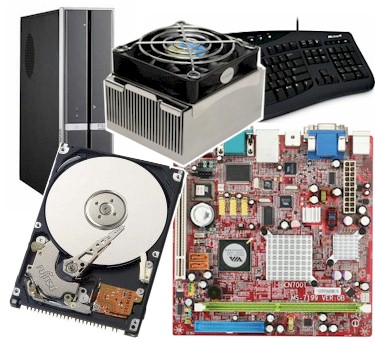
A modern PC is both simple and complicated. It is simple in the sense that over the years, many of the components used to conduct a system have become integrated with other components into fewer actual parts. It is complicated in the sense that is part in a modern system performs many more functions than it did the same type of parts on older systems. The typical components and peripherals found in basic PC system as follows.